SharePoint best practices to get the most from your intranet
Discover SharePoint best practices that make sense for busy communicators. Practical tips to help yo...
Your employees are different. They work in different departments, different locations, different roles. They have different interests, different needs, different ways of working. So why does everyone see the same intranet?
AI is changing what’s possible. Instead of one intranet that tries to serve everyone equally (and serves no one perfectly), AI enables personalization that adapts to each employee. The right content finds the right people at the right time. This isn’t about flashy features. It’s about making your intranet genuinely more useful by understanding what each employee actually needs.
Personalization isn’t new. Organizations have targeted communications to specific groups for years. What AI changes is the scale, sophistication, and automation of that targeting.
Traditional personalization relies on explicit categories: your department, your location, your job level. AI personalization can consider behavior patterns, content interactions, timing preferences, and inferred interests. It learns and adapts rather than following fixed rules.
The result is an intranet that feels less like a corporate broadcast and more like a resource that understands you. News that matters to your work appears prominently. Policies relevant to your role surface when you need them. Colleagues you’d benefit from knowing become visible.
PwC’s recent work on AI-powered employee experience shows what’s possible at scale. Their approach uses AI to surface relevant content, connect employees with expertise, and reduce the time people spend searching for information. The intranet becomes a tool that actively helps rather than passively waiting.
The simplest application: showing employees content that’s relevant to them. Instead of everyone seeing the same news feed in the same order, AI learns what each person engages with and adjusts accordingly.
An engineer sees technical updates prominently. A sales manager sees customer-facing news. A new employee sees onboarding content and cultural pieces that help them understand the organization. This doesn’t mean hiding content. Everything remains accessible. AI just adjusts prominence based on predicted relevance.
Search is often the most frustrating part of any intranet. You know what you’re looking for but can’t find the right words to describe it. AI-powered search bridges that gap.
Instead of matching keywords literally, AI search understands intent. It considers your role, your recent activity, and what people like you typically need when they search for similar terms. The expense policy that a finance person searches for might be different from the expense policy a traveling salesperson needs, even though both searched “expense policy.”
Not every message deserves a notification. AI can learn when employees prefer to engage with different types of content and adjust delivery accordingly.
Some people check the intranet first thing in the morning. Others engage more at lunch. Some prefer email notifications; others ignore them entirely. AI personalization respects these patterns rather than blasting everyone identically.
Large organizations are full of expertise that people don’t know exists. AI can connect employees with colleagues who have relevant knowledge, skills, or experience.
This goes beyond org chart browsing. AI might notice that you’re working on a project similar to one completed by another team last year, and suggest connecting with them. Or surface a colleague in another location who has expertise relevant to a question you asked.
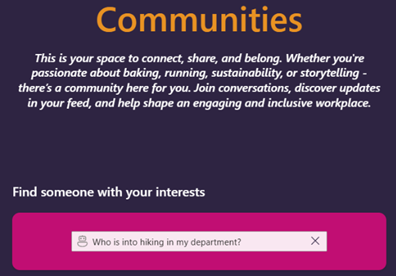
Example of how AI in Fresh helps you find colleagues with similar interests.
New employees face information overload. AI can pace onboarding content based on how each person engages. If someone absorbs the organizational structure quickly, move on. If they’re struggling with a particular system, provide more support.
Rather than everyone following the same rigid schedule, onboarding becomes responsive to individual needs.
Different roles need different tools and information. AI can configure dashboard experiences based on what each employee actually uses.
A manager might see team updates, approval queues, and HR resources prominently. An individual contributor might see project information, learning resources, and technical documentation. The same intranet serves both effectively because it adapts to their different contexts.
Instead of waiting for employees to search, AI can proactively surface information they’re likely to need. Someone joining a new project might automatically see relevant documentation, key contacts, and past project learnings.
This shifts the intranet from reactive to proactive. Rather than being a place employees go when they need something, it becomes a resource that anticipates and prepares for their needs.
“People who read this also found these useful.” Recommendation engines work for consumer content. They can work for enterprise content too.
If employees who read the IT security update also tend to read the remote work policy, surface that connection. If people in similar roles frequently access a particular resource, suggest it to others in that role who haven’t discovered it yet.
These capabilities might sound incremental. But they compound into a fundamentally different experience.
Less time searching: When the right content surfaces automatically, employees spend less time hunting for information. That’s time returned to actual work.
More relevant engagement: People engage more with content that matters to them. Personalization increases the likelihood that important messages actually reach and resonate with their intended audiences.
Better connection: Expertise discovery and colleague recommendations help employees build networks they wouldn’t have found on their own. That benefits both individuals and the organization.
Reduced overwhelm: Instead of wading through everything to find what’s relevant, employees see prioritized content. The intranet feels manageable rather than exhausting.
More equitable access: Personalization can help ensure that important information reaches everyone who needs it, even people who aren’t well-connected or don’t know what to search for.
Personalization requires data about employee behavior. That creates legitimate questions about privacy and surveillance.
The difference between helpful and creepy often comes down to transparency and purpose.
Helpful personalization: “We use your reading patterns to show you relevant news.” Employees understand what’s happening and see the benefit.
Creepy personalization: Collecting detailed behavioral data without clear explanation, using it for purposes employees didn’t expect, or making inferences that feel invasive.
Be transparent: Tell employees how personalization works. Explain what data you’re using and why.
Focus on benefit to employees: Personalization should make their experience better, not just serve organizational goals.
Provide control: Let employees adjust their preferences, opt out of certain personalization features, or see why they’re being shown specific content.
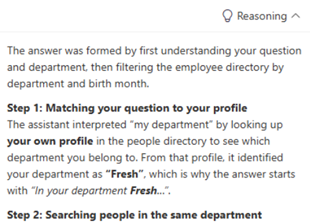
Fresh provides insight into why FreshMind chose to display a specific piece of content.
Protect boundaries: Some data shouldn’t drive personalization. Health information, private conversations, and sensitive personal details should stay separate.
Avoid manipulation: Personalization should help employees find what they need, not manipulate them into behaviors they wouldn’t otherwise choose.
Employees will accept personalization they find valuable and reject personalization that feels intrusive. The same technology can land either way depending on how it’s implemented and communicated.
Organizations that build trust gradually, starting with clearly beneficial personalization and demonstrating responsible data use, can eventually implement more sophisticated features. Organizations that overreach early may find employees resistant to any personalization at all.
You don’t need to implement everything at once. Start with personalization that offers clear value and carries minimal risk.
Begin with content targeting: Most organizations already segment communications somewhat. AI can make that targeting smarter without requiring new infrastructure.
Improve search: AI-enhanced search is high value and relatively uncontroversial. Better search clearly benefits employees.
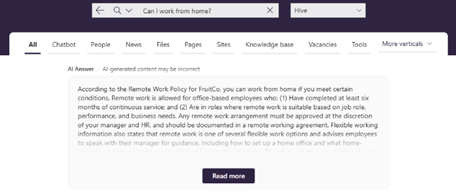
AI mode in Fresh Search offering experiences similar to Google and Bing.
Add recommendations gradually: Start with simple “related content” suggestions before implementing more sophisticated behavioral recommendations.
Communicate transparently: Before launching personalization features, explain what you’re doing and why. Invite feedback.
Measure both engagement and sentiment: Track whether personalization improves metrics, but also whether employees appreciate it. Both matter.
Fresh incorporates AI throughout the intranet experience, designed to help employees find information and colleagues more effectively.
AI-powered search helps employees get to the right information faster, using natural language instead of complex filters. By taking into account who someone is, where they work, and what they have access to, Fresh can surface relevant content and colleagues in a way that feels personal, useful, and transparent.
This personalization runs on SharePoint-native infrastructure, so your content stays within Microsoft 365 while the employee experience becomes more intelligent and responsive.
Mass communication worked when organizations were smaller and employees had similar needs. Today’s workforces are diverse, distributed, and drowning in information.
AI personalization creates intranets that actually serve employees as individuals rather than treating everyone as identical recipients of identical content.
Done well, personalization makes your intranet more useful, more engaging, and more valued. Done poorly, it erodes trust and feels invasive. The difference is in the implementation.
If you’re interested in AI-powered personalization that respects employees while improving their experience, [Fresh might be worth exploring]. A SharePoint-native intranet designed to help the right content reach the right people.
Your employees aren’t all the same. Their intranet experience shouldn’t be either.
Discover SharePoint best practices that make sense for busy communicators. Practical tips to help yo...