SharePoint best practices to get the most from your intranet
SharePoint is a powerful platform. It’s flexible, it’s deeply integrated with Microsoft 365, and it can do an enormous amount. But like any powerful tool, getting the best from it takes a bit of know-how.
The good news? A few smart SharePoint best practices can make the whole experience smoother. Not by turning you into a SharePoint expert (nobody’s asking that of you), but by making the daily stuff like publishing content, finding files, keeping your team on the same page feel effortless.
What you’ll learn:
- Why a bit of upfront planning makes all the difference
- The practical changes that help you get more from SharePoint
- How to set things up so they stay tidy without constant effort
- What Fresh does to help you make the most of SharePoint
Why do SharePoint best practices matter?
SharePoint gives you a lot of flexibility, which is brilliant, but it also means the experience you get depends on how you set things up. With a few guardrails in place, teams stay organized, content stays findable, and everyone knows where things live.
For communicators, that’s the goal. You’re already juggling newsletters, updates, crisis comms, and the CEO’s last-minute request to “just quickly update the homepage.” The smoother your SharePoint setup, the more time you have for the work that really matters.
SharePoint best practices aren’t about becoming technical. They’re about setting things up once, so you don’t have to think about them again. Less friction. Fewer questions. More time for the message.
The payoff? Colleagues can find what they need without emailing you. Content stays consistent. And your intranet becomes something people genuinely rely on.
Common SharePoint challenges (and how to solve them)
Every organization’s SharePoint environment is different, but a few challenges come up time and again. The good news: they’re all solvable.
Deep folder structures. SharePoint supports folders, and they’re useful — but too many layers can make navigation tricky. The solution: keep structures shallow (three levels maximum) and use metadata to add flexibility without adding clicks.
Version management. SharePoint has excellent built-in versioning, but it only works if people use it. When team members create copies instead of trusting version history — “final_1,” “final_final,” “new_final_02022026” — things get cluttered. The solution: a quick training session on how versioning works, and clear guidance to trust the system.
Permission complexity. SharePoint’s permission system is sophisticated, which means it can get complicated if settings are changed ad hoc. The solution: stick to default security groups where possible and document any exceptions.
Homepage maintenance. A homepage that felt fresh in 2022 can start to look dated. The solution: build in regular review cycles and make updates easy for the people responsible.
Content in the wrong places. SharePoint lets you create news posts from almost anywhere — team sites, department sites, project spaces. That flexibility is useful, but it means authors need to know where to publish so content surfaces in the right feeds. The solution: define approved publishing locations and make them obvious to content creators.
Limited engagement insight. SharePoint provides page-level analytics, which is helpful but doesn’t always show the full picture of how content performs across your intranet. The solution: supplement with broader analytics or use a tool like Fresh that provides deeper engagement insight.
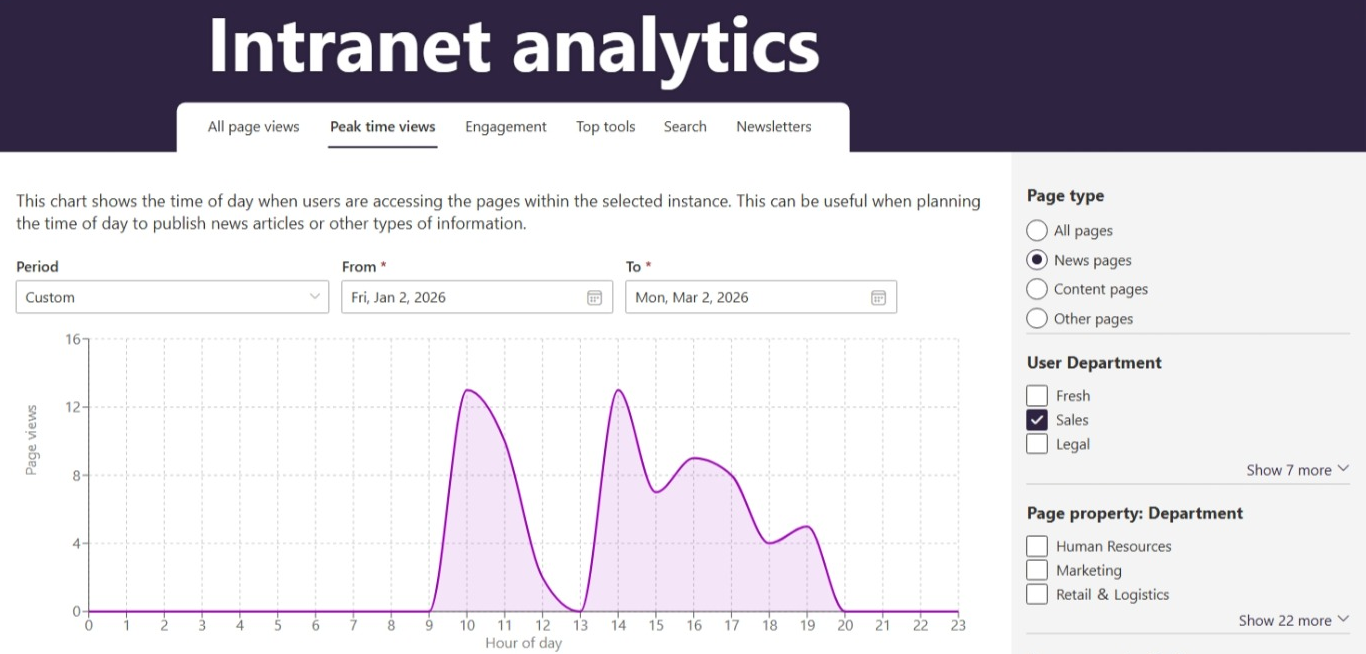
Use a tool like Fresh and get deep engagement insights.
Mobile experience. More employees access intranets on the go, and SharePoint’s responsive design helps — but it’s worth testing your specific setup on actual devices to make sure everything works smoothly.
None of these challenges are insurmountable. With the right approach, SharePoint becomes the reliable foundation your intranet needs.
Essential SharePoint best practices to follow
These aren’t technical deep dives. They’re the practical changes that help you get the most from SharePoint.
Keep your folder structure simple and consistent
Folders are useful, but deep structures can slow people down. A better approach: broad categories at the top level, clear naming conventions, and a rule that if you can’t explain where something belongs in five seconds, the structure needs simplifying.
SharePoint folder structure best practices usually come down to one principle: if a new team member couldn’t find a file on their first day, it’s worth revisiting.
Use metadata instead of endless folders
This sounds technical, but it’s genuinely useful. Instead of creating a folder for every project, every year, and every team, you can tag documents with metadata like “2025,” “Marketing,” “Policy” and then filter or search based on those tags.
The result? One location with documents you can sort however you need, rather than clicking through multiple folders.
Set permissions properly from the start
SharePoint’s permission system is powerful. Keep it simple by sticking to the default security groups (visitor, member, owner) rather than creating custom groups for every situation. Use groups rather than individual permissions, keep the structure logical, and document it somewhere. Future you will be grateful.
Be clear about where news should be created
Define a small number of approved places for publishing news, and make that obvious to content creators. When authors know exactly where to publish, their content reaches the right audience every time.
Measure performance beyond individual pages
Page views and reactions are useful starting points. To get a fuller picture, look at how content performs across your intranet over time. Fresh provides this kind of deeper insight, helping you understand engagement rather than just count clicks.
Make the homepage work hard
Your intranet homepage should help people find what they need quickly. That means current news, clear navigation, and a layout that’s easy to maintain. Build in regular review cycles to keep it fresh.
Embrace mobile
SharePoint’s modern sites are responsive by default, which is a great foundation. Test on actual devices to make sure your specific setup works well and consider Viva Connections for a dedicated mobile experience.
Keep navigation intuitive
Good navigation helps people find content without relying on search. SharePoint’s hub sites and global navigation features let you create logical pathways through your intranet. The goal: employees should be able to reach any important content within two or three clicks.
Review your navigation periodically. As your organization evolves, the shortcuts people need may change too.
Tips for optimizing SharePoint performance
Beyond the basics, a few extra considerations help you get even more from SharePoint.
Keep content current. Regular archiving keeps libraries manageable and search results relevant. A simple review cycle — quarterly or twice yearly — makes a big difference.
Make search work harder. SharePoint’s search is genuinely capable. Help it along with descriptive document titles and consistent metadata and encourage people to search rather than browse.
Train the basics (just the basics). You don’t need to turn everyone into SharePoint experts. But a 10-minute overview of how to find files, upload documents, and use versioning can save hours of questions later.
Create templates for common tasks. If your team regularly creates the same types of pages or documents, templates save time and keep things consistent.
Establish clear ownership. Every site and major content area benefits from having someone responsible for it. This doesn’t mean full-time administration — just someone who checks in periodically, keeps content current, and answers questions. Clear ownership prevents the “nobody’s looking after this” drift.
Document your decisions. A simple reference document explaining your folder structure, naming conventions, and permission approach saves time when questions come up. It also makes onboarding new team members much smoother.
Getting Even More From SharePoint With Fresh
Fresh is a SharePoint-native intranet built for communicators. It works within Microsoft 365 and builds on SharePoint’s strengths — adding features designed specifically for internal communications teams.
Without Fresh: SharePoint gives you a solid foundation. You configure themes, build pages, manage navigation, and use the built-in analytics. It works well, especially with good planning and governance.
With Fresh: You get everything SharePoint offers, plus purpose-built features for communicators. Your brand is applied consistently from day one and managed centrally. Content publishes to the right location automatically. Analytics show you how people engage across your entire intranet, not just page by page. And the whole experience is designed around how communicators actually work.
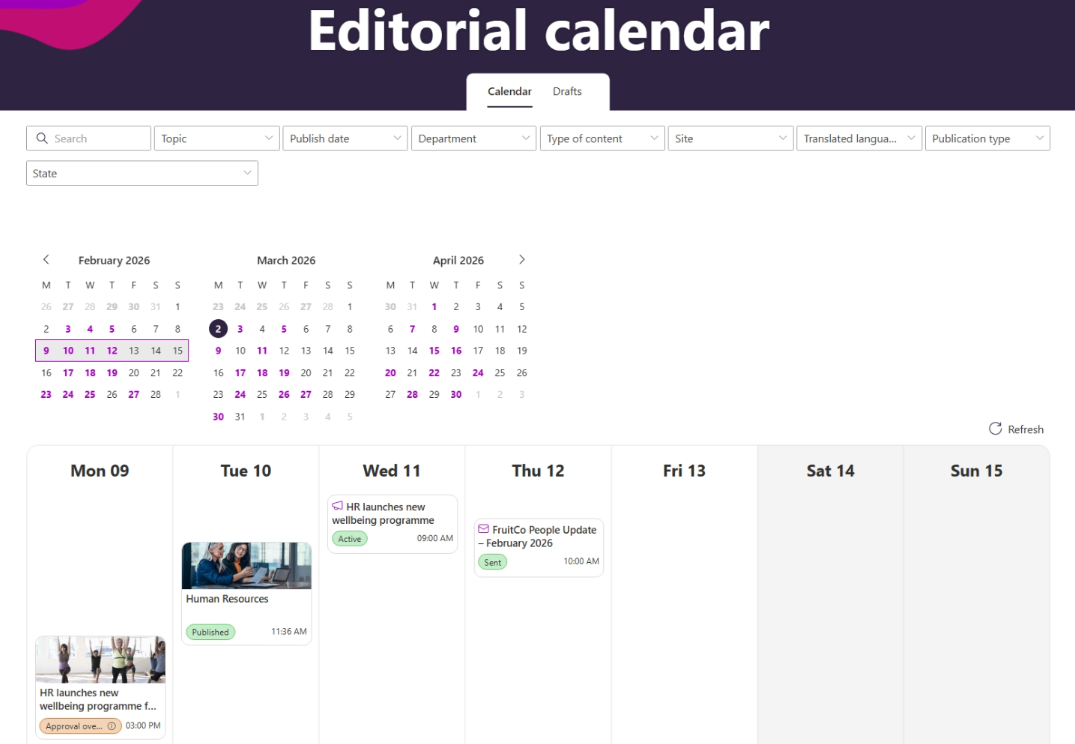
A centralized editorial calendar in Fresh for planning and managing intranet content.
Fresh doesn’t replace SharePoint — it helps you get more from it.
FAQ
How can businesses improve communication using SharePoint best practices?
By being intentional about structure, ownership, and visibility. Clear publishing locations, consistent page layouts, and a homepage that surfaces what matters help important messages reach the right people. When updates are easy to publish and easy to find, SharePoint becomes a reliable communication channel.
How can businesses improve collaboration using SharePoint best practices?
The biggest collaboration boost comes from making things findable. Clear folder structures (or better, metadata-based organization), sensible permissions, and a homepage that directs people to what they need. When employees can find documents easily, collaboration flows naturally.
What are some common pitfalls to avoid when implementing SharePoint best practices?
Over-complicating folder structures, setting permissions ad hoc instead of systematically, and building beautiful sites that nobody maintains. The best SharePoint setups are simple, sustainable, and don’t require someone to “own” them full-time.
Are there any tools that can help optimize SharePoint for better performance?
Fresh is designed exactly for this. It builds on SharePoint, giving you modern publishing, clean design, and deeper analytics while keeping everything within Microsoft 365.
What is the best way to organize SharePoint?
Start with how people actually work. Broad categories, clear naming, shallow folder structures (three levels maximum), and metadata for anything more complex. Simple and consistent beats elaborate and fragile.
Make SharePoint work brilliantly for you
SharePoint best practices aren’t about mastering complexity. They’re about setting things up thoughtfully so your intranet runs smoothly and your team can focus on communicating.
If you want to take SharePoint further, (Fresh might be worth a look). A SharePoint-native intranet designed for communicators and built to help you get the most from the platform you’re already using.
Because SharePoint is capable of brilliant things. Let’s make sure you’re getting them.